 PnP
PnP Load check
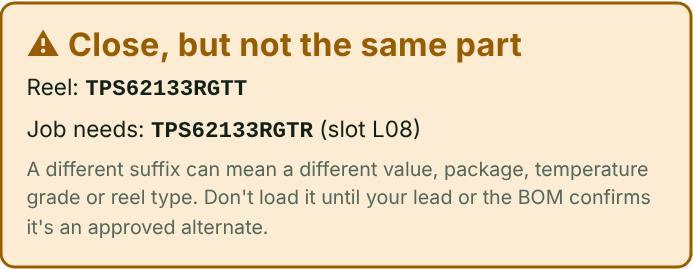
Scan or type each reel before it goes in a feeder. The answer is instant: on this job with its slot, close but not the same part, or not on this job. Reel counts give a warning before a reel runs out mid-job.
How to use it
- Open the saved job.
- Scan the reel with the camera or a barcode scanner, or type the part number.
- Load it only on a green “On this job”.
Proof it works
- Load check passes the right reel PASS
- Load check catches a different suffix PASS
- Load check stops the wrong reel PASS
- Warning before a reel runs out PASS
On your machine
The words in this tool follow the machine you pick: “nozzle” or “tool”, “feeder”, “intelligent feeder” or “Agilis feeder”.
Part categories it helps with
Other features
- Machine picker
- QFN decoder
- Parts library
- Scan and capture
- Kitting list from the BOM
- MSL floor-life timers and bake times
- Mispick log
- Shift handoff note
- Machine setup sheet
- Team file and sharing
- Job setup checklist
- Rotation helper
- Unit converters and size codes
- Tape, feeders and ordering
- Tips from the floor
Try PnP Toolkit free for 30 days
No credit card. Works on any phone or line PC. After the trial it’s $49/month per machine.